
The business leaves the loose notebooks
Products, sales, and money movement live in one place. You look a number up instead of reconstructing it.
 YCR ONE · For businesses
YCR ONE brings inventory, sales, and finances together. It works for one company or several. The owner sees the whole picture. Someone on the team signs in with a narrower role. And when a customer buys, you can send the warranty or a voucher on WhatsApp.
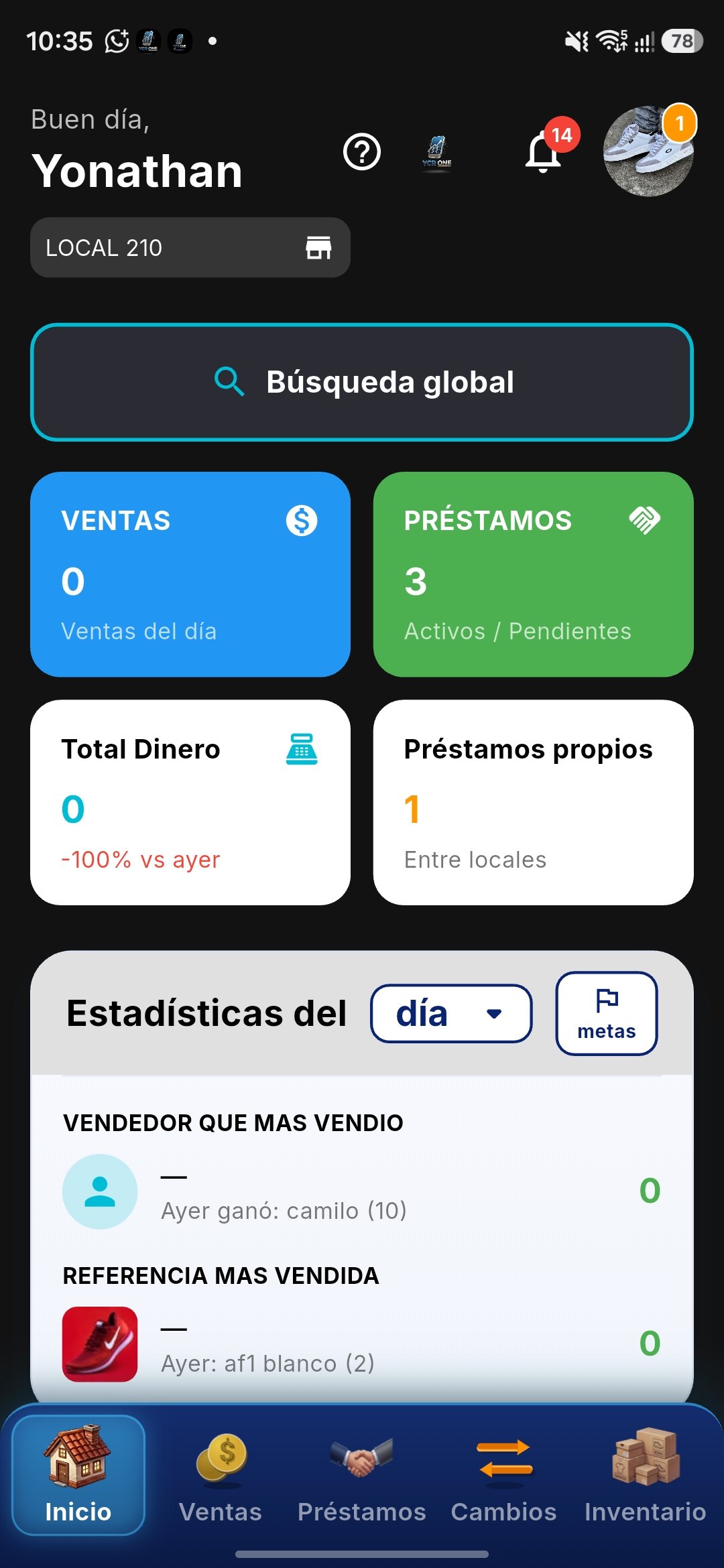
Products, sales, and money movement live in one place. You look a number up instead of reconstructing it.
Switch companies without mixing stock or accounts. Invite the people who work with you.
The customer gets the message on WhatsApp, the app they already use. You keep a record that it was sent.
Roles are there for that. Someone can record a sale without opening the full finances.
Feature guide
Read the module you need today. You do not have to tour all of them on the first afternoon. Start with inventory and one practice sale.
This guide walks the general path in everyday language. Where a real screen already exists, you see it inside the phone. The other steps are just the explanation: a button name may shift a little when we update the app.
01
This is where what you sell lives: how much you have, what came in, and what went out.
Step 1
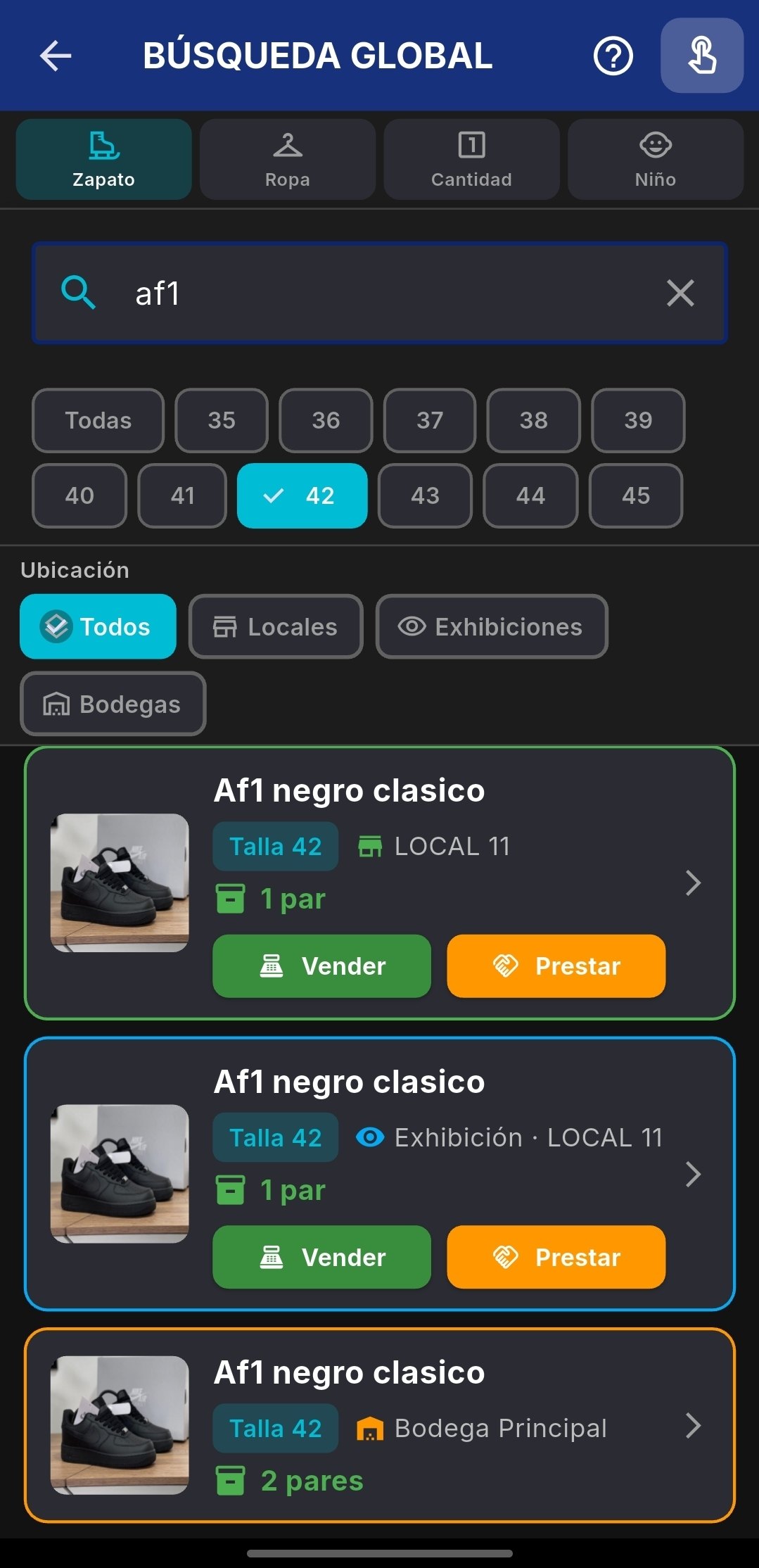
In global search you type the product, pick the type and the size, and see whether it is in the shop, on display, or in the warehouse. From that same screen you can sell it or lend it. If it is not on the list yet, create it with a name you would actually say, and a price. Use the name you say at the counter.
Step 2
A purchase from a supplier is stock coming in. A sale, a gift, or a loss is stock going out. Once those are written down, the inventory number is no longer a guess. If the delivery arrived in the morning, record it before you open the register so the day starts from the real count.
Step 3
When a product drops below the amount you chose, the app shows it. You can reorder before you have to tell a customer it is gone. Check that list a couple of times a week, not only when someone asks for the missing item.
02
Recording a sale also updates stock and leaves a history.
Step 1
When you open the app you see today’s sales, active loans, the cash total, and a short summary: who sold the most and which item moved. When you are about to charge, build the sale calmly: choose the company, add the products, and say the total out loud before you take the money. An extra zero shows up there.
Step 2
Mark how they paid: cash, transfer, or another method you use. The sale stays saved with what left, for how much, and for whom. That record feeds inventory and finances, so you do not need to write the same sale again in a notebook.
Step 3
History shows sales for a day or a range of dates. Use it to recall an order, answer a customer, or see how the week went. When someone says “I paid yesterday”, this is the place to check, without arguing from memory.
03
The business’s money, kept apart from the household’s.
Step 1
Record money entering the business and money leaving it: rent for the shop, stock, transport, a payment to a supplier. Then you know whether the operation is actually producing a result, not only whether the drawer feels full today.
Step 2
If a customer will pay later, it stays as money to collect. If you owe a supplier, it stays as a bill to pay. It does not live only in a WhatsApp thread you will not find later. Add the date you expect the payment, so the reminder comes from a fact.
Step 3
At the end of the shift, look at what you sold, what landed in the drawer, and whether there is a gap. A short close, a few minutes, prevents the surprise at the end of the month. If the number is off, today is the day you still remember the odd sale from the afternoon.
04
More than one company in the same app, and a separate sign-in for each person.
Step 1
If you run more than one business, each one has its own inventory, sales, and numbers. You switch company inside the app without mixing the information. Name them the way you already say them out loud.
Step 2
The owner does not have to lend out a password. Each person gets their own access. If someone leaves, you remove that access and everyone else stays as they were. Sharing a password feels faster on day one and becomes a problem the following month.
Step 3
The owner sees the whole picture. Someone on the team can, for example, record sales without opening the full finances. Choose the role from the task, not from how much you trust the person. A trusted person can still have a narrower door. It protects them and it protects the numbers.
05
A clear note for the customer, sent on WhatsApp.
Step 1
When someone buys something that carries a warranty, prepare the message with what they need: what they bought, how long it is covered, and how they can claim. Write it the way you would say it at the counter. This is your warranty with your customer. It is not a warranty of the app itself.
Step 2
A voucher is a reason for the customer to come back: a discount, a credit, a small thank-you. Write what it includes and the date it lasts until. Without a date, a voucher turns into an argument. With a date, it is a concrete promise.
Step 3
From the app, send the warranty or the voucher to the customer’s number. It arrives in the chat they already use, and you keep a record that it went out. Check the number first. One wrong digit and the message goes to someone else.
06
A summary so decisions come from what happened, not from how the day felt.
Step 1
You can review sales, inventory, or the movement of money. Pick the period: today, this week, or the month. A short range is for the daily rhythm. A full month is for sitting down with a partner or with your accountant.
Step 2
The report puts the useful parts forward: how much sold, which products moved, and where inventory stands. If a number looks strange, open the detail of that sale or that product. The summary does not replace your judgment. It gives you something solid to hold.
Step 3
The result is there for a partner, for your accountant, or for you next week. Deciding from what happened is calmer than deciding from a feeling. If you are about to send it, check that it is the right company first.
Downloads
Write to us on WhatsApp and tell us which step you were on. We answer in Spanish, and we will do our best if you write in English, until it is working.